
Rules Tab
This tab allows you to select the meta-data fields and to define the exclusion criteria. Teekesselchen uses the selection to determine duplicates. Sometimes this plug-in marks photos as duplicates which are none, e.g. photos from a continuous shooting with an equal timestamp. In this case you should define a keyword for photos which Teekesselchen has to ignore. Add this keyword to the specific photos and remove the keyword for duplicates. These photos will never be marked as duplicates again.
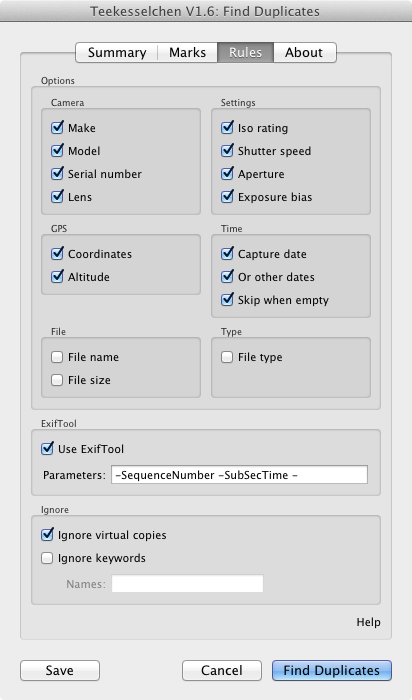
The Rules tab
Options
This section offers the selection of meta-data about the camera, settings during the image acquisition, global positioning system (GPS) and the capture time. Teekesselchen takes the selected meta-data fields and marks photos with equal values as duplicates. Usually it is a good idea to select all fields but you can reduce the processing time by using less meta-data fields. An empty meta-data field will always be ignored.
You can now chose the file name, size and type as criterion. Usually it is not a good idea to use this, but in some special cases it can be useful. The recommendation is: try to avoid name and size but use it when necessary.
The capture date can now be deactivated (this was not possible in earlier releases).
ExifTool
ExifTool is a programm written by Phil Harvey which, extracts Exif metadata from photos. Teekesselchen can use this application to get more information, e.g. the sequence number or the sub-second. This can be very helpful for continuous shootings. Lightroom supports only seconds as smallest unit leading to unmeant duplicates if you take more than one photo per second.
If you turn on this option then Teekesslechen uses the ExifTool only for potential duplicates. The execution is pretty expensive (in terms of execution time) and can slow down the duplicate finding process.
Another challenge are the different metadata fields. Nikon's raw format supports the sub-second but not the sequence number. Panasonic's format doesn't know sub-seconds but provides the sequence number. Thus, it is not guaranteed that ExifTool can help you with your specific format.
Please take a look at the ExifTool documentation and share any useful tags with us. You can use the commenting function at the bottom for this.
Ignore
Not all photos should be taken into account during the search for duplicates. In order to make the selection of photos still comfortable you can define criteria when photos should be ignored. The first option are the so called virtual copies. They are referencing a master photo and have usually the same meta-data. Thus, virtual copies are usually detected as duplicates. Select this check-box to avoid the inclusion of virtual copies.
You can also mark photos with a keyword to exclude them from the search for duplicates. The field "Names" is a comma-separated list of keywords. All photos with one or more of the passed keywords will be ignored.
Go to old version 1.5
using oxX 10.10.5, lightroom CC - in searching for duplicates, I can't get the plugin to ignore a keyword "B&W" I am using to distinguish black and white images - suggestions?
Hi John,
maybe the ampersand is the problem. I have to take a look at it. At the moment I would use the selection function in Lightroom and take all pictures without this keyword. Use the plug-in and thereafter do a second run with all images having the keyword "B&W".
Thanks
Michael
When I select multiple option do they have to be (#1) all true OR does (#2) at least one of the options have to be true in order to qualify a photo as a duplicate. I did a test with filename and date options checked off and the behaviour suggestions that only one option (#2) has to be true. It would be nice to have the option of using AND versus OR condition.
IOS 15 / iPhone HEIC photos work better adding the -SubSecTimeOriginal to the Exiftool options. At least in my library of iPhone photos. -SubSecTime is rarely set, but -SubSecTimeOriginal is generally set to a useful value. This should probably be in your default set of options.
Going through my entire Photos archive, I've found few files with SubSecTime set. I've found multiple instances of HEIC iphone photos taken within a second of one another. Adding this extra flag removes all of the HEIC false positives I've found so far.
I'm struggling with Exiftool...I shoot with either a Nikon or Olympus and often in high-speed (burst) mode for birds. I cannot get it to ignore photos shot in the same minute...it's giving me 37,000 duplicates but almost all of them are just consecutive photos. Are there specific settings I need to use so I can just find actual duplicates? I don't care how long it takes, I'd just love to delete real duplicates. Thanks!
Also, do I need to do anything to install Exiftool separately? I just checked the box under rules when I ran it last?
Analysing a large series of photos, I found several sets of duplicate or more, nevertheless, the original was not always present in the dynamic duplicate folder. What is the reason for this absence (I know that the keyword "duplicate" has to be absent from the photos and I checked it) ?
Thanks
Georges