
Summary Tab
This tab gives you all relevant information about the upcoming comparison. Depending on your current configuration, you will see more or less lines.
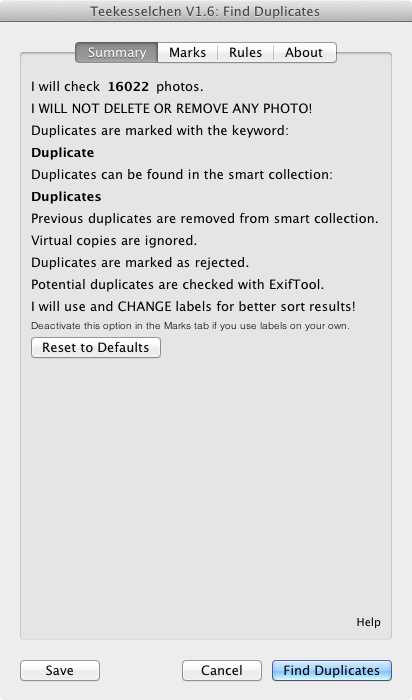
The Summary tab
Push the button "Reset to Defaults" if you have made changes and want to return to the default settings. The button "Save" at the extreme bottom allows you to store your changes without a run. If you use the "Cancel" button then all your new settings are lost. Push the "Find Duplicates" button to store your settings and to kick off the comparison. A dialog with a progress bar will pop up and inform you about the state of the process.
Go to old version 1.5
Program CRASH on first attempt to identify duplicates in Lightroom Classic:
"attempt to preform arithmetic on field "width" a nil value"
Saw a similar problem 4 years ago...is there a solution?
I am using the latest version of Lrc in Win 10. I have used Tekesselchen to find the duplicates of which there are 18124! In reviewing the scan results in the smart collection "Duplicates", I found that in the majority of cases the app has marked for deletion the copy which had already been put in a collection. I did not want to have to find and re-place all those photos in their collections. It appeared necessary to examine each one as sometimes the deletion flag was correctly placed. I worked out a way of swapping the reject flag to the photo I wanted to retain in batches by temporarily putting a 1 star rating on the keepers which had the rejected flag. Because of the huge number of duplicates, I had to work in batches guided by the teekesselchen coding.
The duplicates are individually listed in the Label filter but suddenly the filter stopped displaying the teekesselchen codes for each photo at a point way before where I had already reached. I know the photos are still there in the duplicates smart collection because the correct number (18124) appears just above the ribbon in Library view of the dup;icates collection and the Label filter's top line reads "All (15054)........18124". (I don't understand that- it appears to say that 15000 of the 18000 in the collection don't have labels now). The filter is only displaying a fraction of the collection. How can I correct this? I have rebooted the app and the whole computer to no avail, but I haven't re-installed Lrc as yet.
Of course, if Teekesselchen was able to choose to keep the copies that are already in collections, that would help a lot but I can't see a way of doing that.
I'm looking for a way to correct the filter, but I would certainly be open to ideas about a less laborious process overall than the one I have started. Or is there a way of getting Teekesselchen to treat the copies already in collections as the keepers?
There's an option to keep higher rated photos, you could rate the photos in your collections and they should be picked over the unrated duplicates, perhaps?
https://uploads.disquscdn.c... This software doesn't work. EVER. This happens at the same place each time. I hope you have a solution. FRUSTRATED AND UNHAPPY.